
FEATURES
Management:
Open WebUI
Managed AI Inference through Open WebUI: delivering enterprise-grade intelligence with an elegant, user-friendly interface for seamless oversight and deployment.
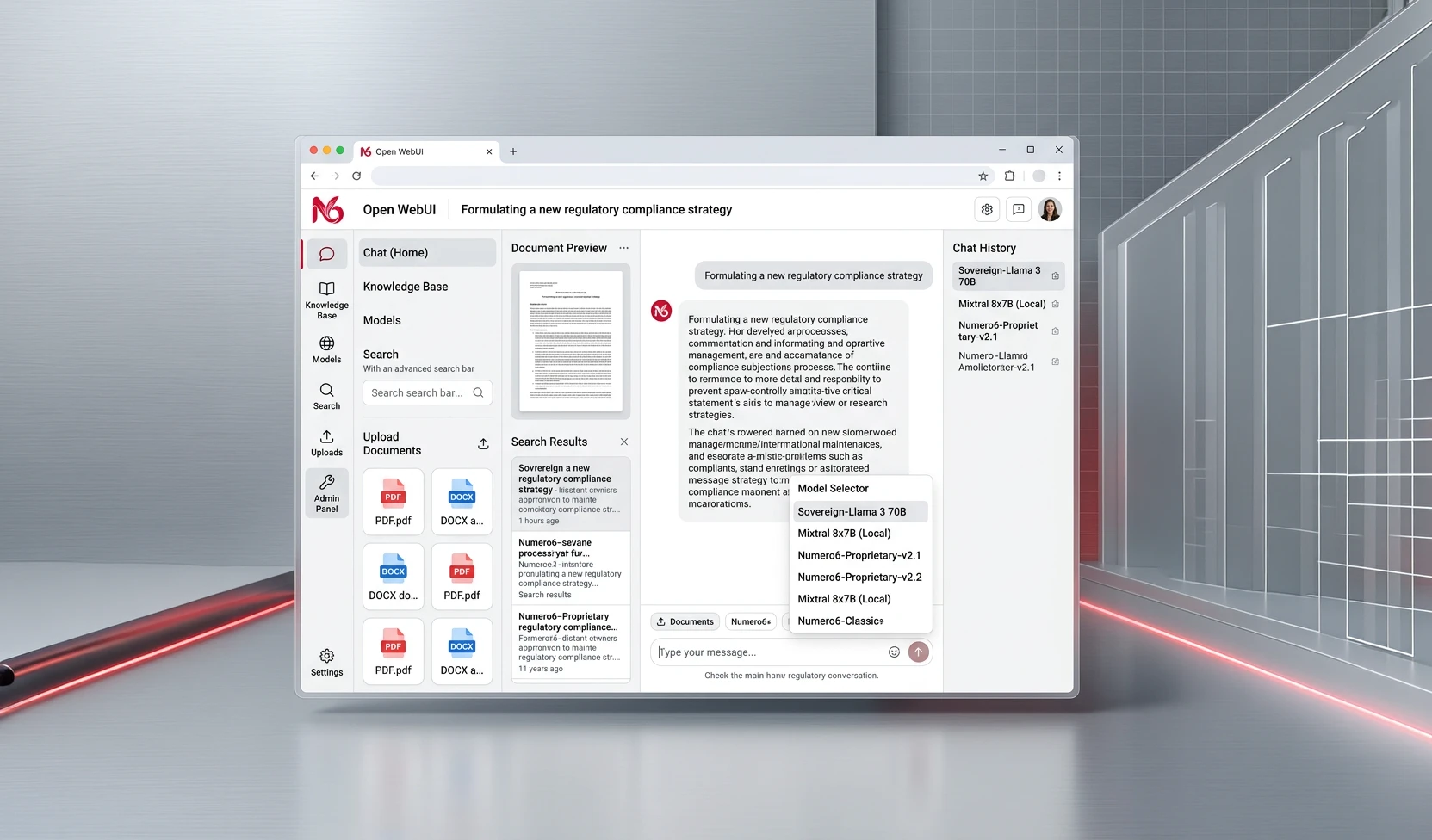
Open WebUI is one of the fastest-growing enterprise AI platforms in the world, serving institutions with tens of thousands of users and praised for its reliability, security posture, and extensibility. As part of every Numero6 instance, your organisation receives a fully configured, enterprise-grade Open WebUI deployment — managed, updated, and tuned by our team.
This is not a simple chatbot. Open WebUI is a sophisticated AI workspace that combines conversational intelligence, document analysis, web-connected search, autonomous agents, and API access in a single, elegantly designed interface.
Open WebUI capabilities included
Multi-conversation workspace — Maintain organized, searchable conversation histories. Create dedicated workspaces for different teams, projects, or use cases.
Model selection and switching — Users can choose from all models available in your instance (Ollama models and optional vLLM endpoints) directly from the interface. Switch models mid-session for comparative analysis.
Document upload and in-line analysis — Upload PDFs, Word documents, spreadsheets, and other formats directly into conversations for instant analysis, summarization, and extraction.
Knowledge Bases (RAG) — Create persistent, team-shared knowledge bases from your documents. The AI references your company's actual knowledge, not generic training data. (See RAG page for full details.)
Integrated Web Search — Real-time web search via SearXNG, executed privately within your infrastructure. The AI can research, verify, and synthesise live information without any query leaving your environment. (See Web Search page for full details.
Agentic workflows (MCP) — Connect to external tools, databases, calendars, and business systems through the Model Context Protocol. Your AI moves beyond conversation into action. (See Agentic AI page for full details.)
Voice interaction — Voice input and output supported natively, enabling hands-free interaction with your AI assistant.
Image generation — Optional integration with image generation backends for multimodal enterprise workflows.
Role-based access control (RBAC) — Granular permission management for users, groups, models, knowledge bases, and tools. Ensure each team accesses only what they are authorised to use.
Pipelines and Functions — Build automated processing pipelines and custom AI functions to extend the platform for your specific workflows.
Memory and personalization — The platform maintains user-level context and preferences across sessions, delivering progressively more personalized and relevant responses.
White-label and branding — The interface can be customised to reflect your organisation's identity, suitable for internal deployment as a branded AI assistant.
API Gateway — Open WebUI exposes a fully OpenAI-compatible API endpoint, enabling any application already integrated with OpenAI's API to switch to Numero6 with zero code changes.
Section
ADDITIONAL FEATURES
You’ll also have access to the following features, with more to come as the platform evolves.
Folders
Folders organize chats into clear, shareable workspaces. Each folder can use its own system prompt and dedicated knowledge, helping teams keep related conversations together, maintain context, and separate projects or use cases without confusion, duplication, or unnecessary searching.
Folders organize chats into clear, shareable workspaces. Each folder can use its own system prompt and dedicated knowledge, helping teams keep related conversations together, maintain context, and separate projects or use cases without confusion, duplication, or unnecessary searching.
Notes
Notes give you a central place to store useful information, links, and supporting data. Add them to your workspace and include them in prompts as extra context, so your AI can draw on relevant details when responding to requests.
Notes give you a central place to store useful information, links, and supporting data. Add them to your workspace and include them in prompts as extra context, so your AI can draw on relevant details when responding to requests.
Skills
Skills are reusable, Markdown-based instruction sets that guide the AI through defined tasks, such as writing, analysis, research, or structured workflows. Attach them to models or invoke them in chat to apply consistent guidance whenever it is needed most effectively.
Skills are reusable, Markdown-based instruction sets that guide the AI through defined tasks, such as writing, analysis, research, or structured workflows. Attach them to models or invoke them in chat to apply consistent guidance whenever it is needed most effectively.
Prompts
Prompts are reusable instruction templates that help you start recurring tasks quickly. Invoke them with slash commands, add variables for flexible inputs, and manage access or revisions. They make frequently used requests consistent, shareable, and easy to use across conversations.
Prompts are reusable instruction templates that help you start recurring tasks quickly. Invoke them with slash commands, add variables for flexible inputs, and manage access or revisions. They make frequently used requests consistent, shareable, and easy to use across conversations.
Tools
Tools extend a model beyond text by letting it call built-in capabilities, custom Python plugins, or external MCP/OpenAPI services. They can search the web, retrieve knowledge, run code, query APIs, generate images, or automate tasks. Users enable tools per chat or model.
Tools extend a model beyond text by letting it call built-in capabilities, custom Python plugins, or external MCP/OpenAPI services. They can search the web, retrieve knowledge, run code, query APIs, generate images, or automate tasks. Users enable tools per chat or model.
Automations
Automations schedule prompts hourly, daily, weekly, monthly, or via custom RRULEs. Every run creates a chat through standard completion pipelines, retaining configured models and tools. Users may run, pause, resume, edit, inspect histories, and file chats; administrators govern access.
Automations schedule prompts hourly, daily, weekly, monthly, or via custom RRULEs. Every run creates a chat through standard completion pipelines, retaining configured models and tools. Users may run, pause, resume, edit, inspect histories, and file chats; administrators govern access.
Numero6 services provide more than just an OpenAI-compatible endpoint: they include a complete management system that lets you get up and running in minutes. You can add models, use chat features for querying, and connect your applications through the API.
In addition to the web browser interface, a desktop application is available for Windows, macOS, and Linux. Mobile users can access the web-based UI.
In addition to the web browser interface, a desktop application is available for Windows, macOS, and Linux. Mobile users can access the web-based UI.

Right after login the user of the desktop application can't see any model because his admin didn't enable any model for him

Once admin enables one or more models, the user can start querying the AI service. When using the chatbot UI, users can attach a wide range of additional contents to their request, including files, notes, knowledge, Web pages, previous chats and also upload pictures with their mobile device.

User is ready to use the models right away. For example, to generate code as shown above or to connect an harness (OpenCode, Goose or whatever harness using OpenAI-compatible endpoints).